This page will give you an overview of the specifics to ServiceNow when using Lighthouse. In detail, it will cover:
- What to ask your ServiceNow administrator for
- Work Tracking System Connection
- Authentication
- Query
- Team Backlog
- Board Wizard
- States
- Time in State
- Portfolios
- Additional Fields
- Write Back
- Links back to ServiceNow
- Summary of limitations
ServiceNow support is team level only. Portfolios are not supported and are not planned — see Portfolios for the reason. Read that section before you plan a rollout.
What to ask your ServiceNow administrator for
Most of what Lighthouse needs is granted inside ServiceNow, by someone who is usually not the person setting up Lighthouse. This section is written to be handed over as-is: everything below is a yes/no your administrator can answer, with the detail behind each item linked.
1. A dedicated integration user, with a password. Lighthouse authenticates with basic authentication — see Authentication. A service account is strongly preferred over a personal one.
2. That user on the basic-auth allow list, if the instance enforces one. Recent releases block basic authentication for users without the snc_basic_auth_api_access role. Your administrator can check whether the restriction is active and, if so, grant that role — details and the exact properties to check. Lighthouse cannot see this setting and cannot warn you about it.
3. Read access to the kinds of work your teams track. sn_incident_read, sn_change_read, sn_request_read — grant the ones matching the record classes you will use. These are genuinely read-only roles. See Permissions and the minimum role set.
Do not ask for snc_read_only. Despite the name it grants no read access at all — an account holding only that role behaves exactly like one holding no roles.
4. Only if you want time in state or cycle time broken down by state — two more things:
- the
itilrole on the integration user, because ServiceNow’s metric tables are closed to every read-only role, and - a Field value duration metric definition on the state field of each record class your teams read.
Item 4 is the one that most often needs work, because stock ServiceNow does not ship those definitions consistently — incident and problem have one, change_request does not. How to check what exists and how to create a missing one are written as click-by-click steps.
Everything except item 4 is optional to get value. Without itil and the metric definitions, Lighthouse still gives you throughput, WIP, work item age and forecasts. You lose time in state and cycle time by state, and nothing else.
Work Tracking System Connection
To create a connection to a ServiceNow instance, you need three things:
| Field | Example | Notes |
|---|---|---|
| Instance Url | https://dev12345.service-now.com | The base URL of your instance, without a trailing path |
| Username | lighthouse_integration | A dedicated integration user is strongly recommended over a personal account |
| Password | See Authentication below |
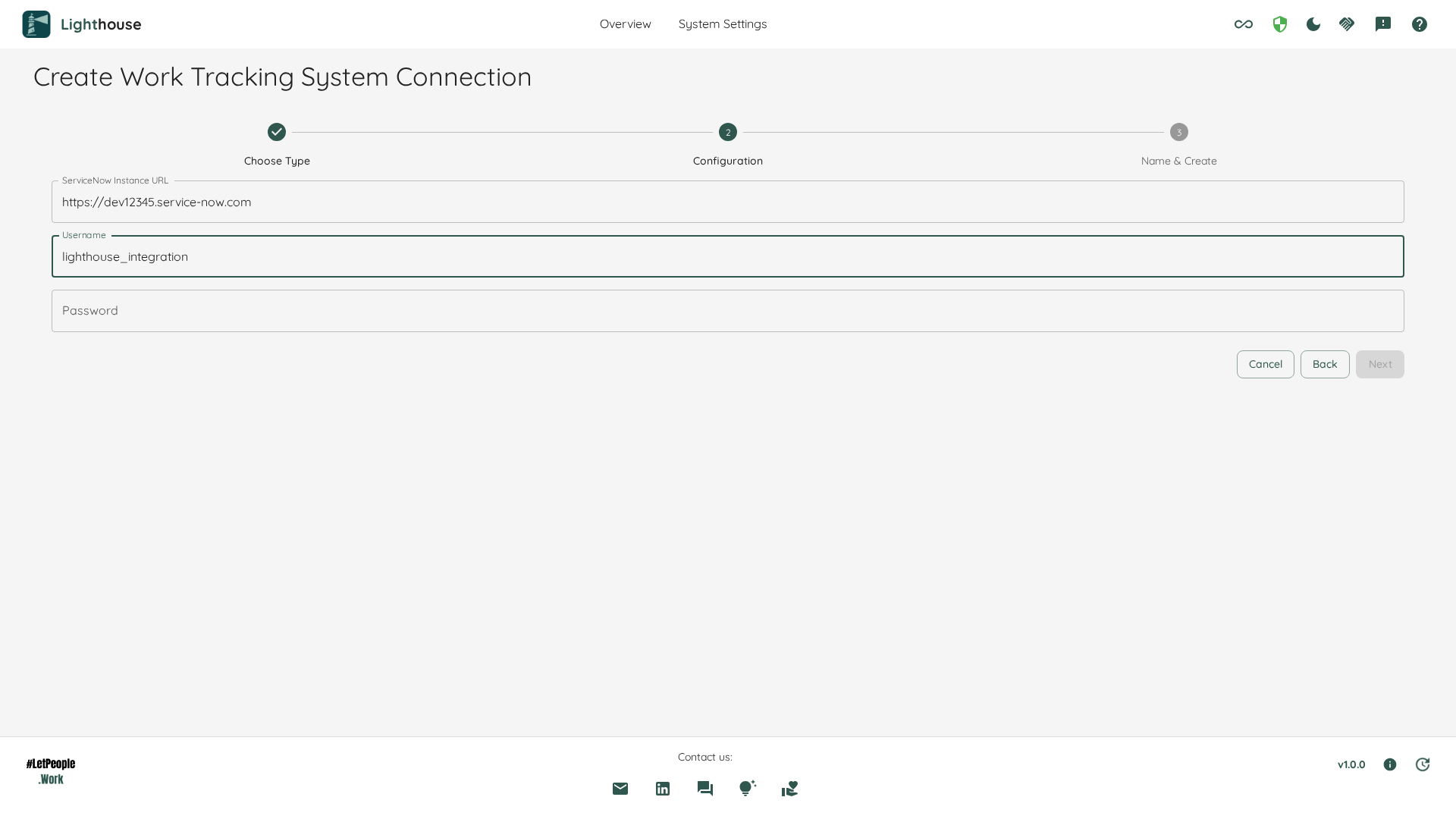
Treat the password as what it is: don’t share it, and don’t keep it anywhere in plain text. Lighthouse encrypts it before it is written to the database, never sends it back to the browser, and you can revoke the account’s access in ServiceNow at any time. Security explains how that works, and what it does not protect against.
Authentication
Basic Authentication
Basic authentication is the only method this version supports. OAuth is planned as a successor, but is not available today.
The snc_basic_auth_api_access prerequisite
ServiceNow has been tightening inbound basic authentication platform-wide. On current releases an instance carries a restriction that, once enforced, blocks basic-auth requests from any user who does not hold the snc_basic_auth_api_access role.
Before you connect, have a ServiceNow administrator check these four properties in sys_properties:
| Property | What it means |
|---|---|
glide.authenticate.basic_auth.restriction.active | Whether the restriction feature is switched on |
glide.authenticate.basic_auth.restriction.enforce | false means tracking only — nothing is blocked yet |
glide.authenticate.basic_auth.restriction.enforcement_date | The UTC moment blocking begins |
glide.authenticate.basic_auth.allowed_roles | Normally snc_basic_auth_api_access |
If the restriction is active on your instance, grant snc_basic_auth_api_access to the integration user, or add that user to glide.authenticate.basic_auth.allowed_users. It is a small grant, but it is an instance-side setup step — plan for it rather than discovering it when your integration stops working.
ServiceNow’s community guide Understanding ServiceNow’s New Basic Authentication Restrictions walks an administrator through the tracking and enforcement phases, the full list of allowed access paths, and the Web Service Access Only option.
Lighthouse cannot warn you about this. Reading those properties requires elevated rights. To the least-privilege account you will give Lighthouse, sys_properties answers 200 OK with zero rows — indistinguishable from “the restriction is not configured”. A privileged human can check; the product cannot. Do the check yourself.
Permissions and the minimum role set
Lighthouse needs read access to the work tables you point it at, and — only if you want time in state — read access to ServiceNow’s metric tables.
| What Lighthouse reads | Needed for | Minimum role |
|---|---|---|
task and the ITSM classes below it (incident, change_request, sc_task, …) | Work items, throughput, WIP, age, forecasts | sn_incident_read, sn_change_read, sn_request_read — grant the ones matching the classes your teams use |
sys_choice | Reading state labels instead of numbers | None — readable by any authenticated user |
metric_definition, metric_instance | Time in state, cycle time by state | itil |
The good news: everything except time in state works with genuinely read-only roles. A platform team can grant sn_*_read and nothing else.
These roles were measured on a ServiceNow cloud instance by connecting with accounts holding exactly one role at a time. If your instance is customised, or on-premises with a different ACL set, and you find you need more or less than the above, please tell us — the list is meant to be the minimum, not a safe over-ask.
Time in state costs more. metric_definition and metric_instance answer 403 for every read-only role and only open up at itil or above, which is a fulfiller-grade role. If your security posture will not allow that, Lighthouse still gives you throughput, WIP, age and forecasts — you lose time in state and cycle time broken down by state.
snc_read_only grants nothing. Despite its name it is a UI-write-restriction role, not a read-grant role. An account holding only snc_read_only behaves exactly like an account holding no roles at all. Do not use it as your read role.
Why a wrong role looks like an empty backlog
ServiceNow answers a permitted but unauthorised read with 200 OK and an empty result set, not with an error. A naive integration reports “connected successfully, 0 work items found” and sends you hunting for a query bug that is really a permissions problem.
Lighthouse’s connection validation is built to tell those apart: it reads a table the account should be able to see and treats zero rows against a known-non-empty table as a permissions failure. If validation tells you the account cannot read a kind of work, believe it before you start editing your query.
Query
Queries for ServiceNow are written as encoded queries — the same string that appears in the URL after sysparm_query= when you filter a list in the ServiceNow UI.
An example query for a team whose work is identified by an assignment group:
assignment_group.name=Network Support
Conditions are joined with ^ for AND and ^OR for OR:
assignment_group.name=Network Support^priority<=2
The fastest way to get a correct query is to filter the list in ServiceNow until it shows exactly the records you want, then right-click the filter breadcrumb and choose Copy query. Paste that string into Lighthouse. Copy the filter value, not the readable_filter value.
A field’s label is not its column name
This is the single most common ServiceNow query mistake, and it fails silently.
Encoded queries match on the column name. A term naming a field that does not exist is silently dropped, and ServiceNow answers with the table unfiltered — every record, no error.
Measured on a demo instance: Correlation ID=LIGHTHOUSE_DEMO returned all 103 incidents in the table. correlation_id=LIGHTHOUSE_DEMO returned the 36 records actually wanted.
To find a field’s column name, hover the field label on a form and read the name from the tooltip, or open System Definition → Dictionary if your account can reach it.
Lighthouse guards against the worst outcome: when a query selects every record in the table, validation tells you so rather than syncing thousands of unrelated records into your team. If you see that message, look for a label where a column name belongs.
What not to put in the query
The query should not specify which kinds of work you want, nor which states. Both of those are configured outside the query — see Team Backlog and States. Naming them twice is how a team ends up reading less work than it thinks.
Team Backlog
A ServiceNow team is defined by two things: a query and one or more work item types.
Work item types are record classes
In ServiceNow, what Lighthouse calls a work item type is a record class — incident, change_request, sc_task, problem. You can type either the class name or the label ServiceNow shows you:
incident
Change Request
change_request
Lighthouse translates a label to its class before querying, and remembers the words you typed, so messages and the Type column read back in your own vocabulary rather than in platform names.
Every read is addressed to task — ServiceNow’s base work table, which all the ITSM applications extend — and narrowed to the classes you named. That is the one scope that cannot silently read less work than you asked for.
A team that names no work item types reads nothing at all, deliberately. Asking task without naming classes returns every kind of record in it: in one measured case, 579 records of 13 kinds where the team wanted 159 of 2. Lighthouse refuses that read rather than filling your team with unrelated work.
Class names are matched case-insensitively, so Incident and incident both work. A custom class Lighthouse does not know cannot be translated from a label — type its class name.
Board Wizard
If your instance uses Visual Task Boards, you can pre-fill a team’s configuration from one instead of writing the query by hand. The wizard is offered when creating or editing a team — there is no portfolio equivalent, for the reason in Portfolios.
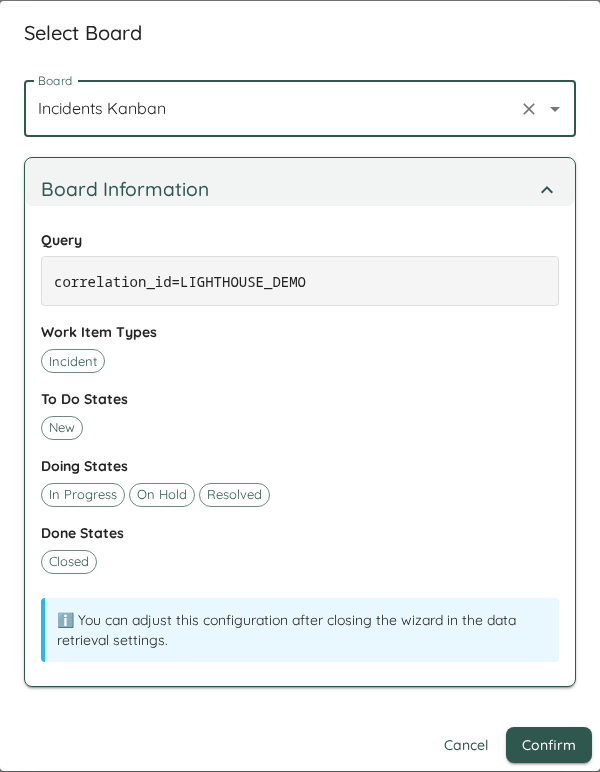
Pick a board and Lighthouse fills in three things from it:
| What it fills | Where it comes from |
|---|---|
| Query | The board’s own filter, verbatim |
| Work item type | The board’s table, in the label form you would read on a ServiceNow screen — Change Request, not change_request |
| States | The board’s lanes, in the order the board arranged them: the first lane becomes To Do, the last becomes Done, and everything between becomes Doing |
Lanes named Canceled or Cancelled are left out wherever they sit, because that work never completed. A board with fewer than three usable lanes leaves the state lists empty rather than inventing a split — map those states by hand.
You can adjust every value afterwards — for example if the lane-to-state mapping is not the one you want. The board is a starting point, not a binding.
Visual Task Boards are shared, not role-scoped: which boards you see depends on what has been shared with the connecting account, not on its roles. If a board you expect is missing, check its sharing settings in ServiceNow. Boards that are inactive, or that carry no table or no filter, cannot produce a usable query and are not offered.
States
States correspond to the state field on the record class, and Lighthouse works with their labels, not their numeric values.
That matters, because the numbers collide across classes: 3 means On Hold on incident and Closed Complete on task. Labels are unambiguous, and sys_choice — where the labels live — is readable by any authenticated account, so label-based mapping works no matter how little the integration account is granted.
As an example, for an incident-based team you might configure:
- To Do
- New
- Doing
- In Progress
- On Hold
- Done
- Resolved
- Closed
States you do not need (for example Canceled) can be left out. Items in unmapped states are not tracked by Lighthouse and will not affect your metrics.
If a record is in a state you never mapped, Lighthouse logs which labels it saw and did not recognise. If a team’s throughput looks too low, check that log before checking your query — a near-miss on a label is the usual cause.
Time in State
Time in state, and cycle time broken down by state, come from ServiceNow’s metric_instance table rather than from the audit log. This has consequences worth understanding before you promise a team the numbers.
Every record class needs its own metric definition
metric_instance carries rows only where a Field value duration metric definition sits on that class’s state field. Definitions attach to concrete classes and never to the base task table, so every kind of work your team names needs its own definition.
Stock ServiceNow is inconsistent about this. Measured on a current demo instance:
| Class | Ships a state duration definition? |
|---|---|
incident | Yes, on incident_state |
problem | Yes, on problem_state |
change_request | No — its definitions sit on approval and type, which are not states |
A team reading change requests on a stock instance therefore gets no time in state for them, however Lighthouse is configured.
How your administrator checks what exists
- In the application navigator’s filter box, type
metric_definition.listand press enter. (The menu entry is Metrics → Definition, but where that sits moves between releases — the list name always works.) - Filter on Type
isField value duration. - Read the Table and Field columns. A class is covered only when a row names that class and its state field.
ServiceNow’s own reference for this feature is Metric definition support.
A row for the right table is not enough — the Field column decides. Stock change_request has two Field value duration definitions, on approval and on type. Neither measures state, so change requests produce no time in state even though the filtered list shows rows for them. Check the Field, not just the Table.
How your administrator creates a missing one
- From the same
metric_definition.listview, click New. - Fill in exactly four things:
| Field on the form | Value |
|---|---|
| Name | Anything descriptive, e.g. Incident State Duration |
| Table | The record class — incident, change_request, problem |
| Field | That class’s state field — see the table below |
| Type | Field value duration |
- Leave Active ticked and submit.
| Record class | State field to use |
|---|---|
incident | incident_state |
problem | problem_state |
change_request | state |
The state field is not called state on every class, which is why it has to be picked per class rather than set once. Other classes follow the same pattern — check the class’s own form for which field holds its lifecycle state.
Two behaviours that surprise people
- Definitions record forward only. Activating a definition today gives you nothing about yesterday. Records that existed before activation have no earlier spans, so history builds up from the moment you switch it on.
- A record’s first span yields no transition. A record needs to move twice after activation before any duration appears for it. A brand-new definition therefore looks broken for a while, and is not.
Where Lighthouse tells you, and where it does not. Lighthouse detects a record class whose spans are not states your team mapped — the stock change_request case above — and writes a warning naming those kinds of work to the Logs in System Info: “ServiceNow supplied no transition history for … because the spans it measures on those records are not states the team mapped.” The rest of the team’s work keeps its history. There is no in-app signal yet, so on the team’s own pages the Time in State column simply stays empty for that class, the same as for work that genuinely moved fast. If a class shows no time in state, check the logs and the metric definition rather than assuming the data is fine.
Portfolios
ServiceNow portfolios are not supported, and are not planned. Pointing a portfolio at a ServiceNow connection is refused with an explanation rather than silently producing an empty forecast.
The reason is in the data, not in Lighthouse. ITSM tables carry no parent record a portfolio could be forecast over:
task.parentexists in the schema but sits empty in practice — measured as populated on 0 of 94 records on a demo instance.- The project, portfolio and demand tables are not exposed to reporting-grade credentials, so even where a hierarchy exists, the account you would give Lighthouse cannot read it.
If you need portfolio-level forecasting, point the portfolio at another work tracking system. Teams on ServiceNow still contribute their throughput and forecasts.
Additional Fields
ServiceNow connections bring no predefined additional fields, and the additional-fields editor is not offered for them.
Write Back
Writing back to ServiceNow is not supported. Lighthouse reads from your instance and never modifies it. No business rules, flows or scripted REST endpoints need to be installed on your side.
Links back to ServiceNow
Every work item Lighthouse shows carries a link to its record in ServiceNow, built from the record’s own class — so a team reading several classes gets a correct link per row rather than one guessed from the team’s configuration.
Summary of limitations
| Capability | ServiceNow |
|---|---|
| Team metrics, WIP, age, throughput, forecasts | Supported |
| State mapping by label | Supported |
| Board-driven configuration | Supported, where Visual Task Boards are in use |
| Time in state / cycle time by state | Supported, but requires itil and a per-class metric definition |
| Portfolios | Not supported, not planned |
| Dependencies | Not available — ServiceNow has no dependency link Lighthouse reads |
| Additional fields | Not available |
| Write back | Not supported |
| OAuth | Not available — basic authentication only |